Performer resources
Commission calculator
Work out the commission and HST owed on a booking, then send your payment with the right documentation.
Calculate what you owe
Enter the gross labour amount from your voucher or Time Report Summary to see the commission and HST owing.
This calculator is provided as a guide. Confirm amounts with your voucher, Time Report Summary and your agent.
Which figure do I enter?
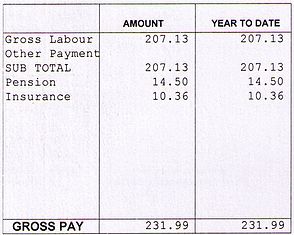
Enter the gross labour paid to you for the booking — the amount before deductions, shown on your voucher and on the Time Report Summary at the top of your pay stub.
All commissions must include 13% HST. Commission includes but is not limited to payments received for COVID tests, mileage, travel, wardrobe and equipment, cars and pets.
How to pay
Commission payments can be made by Interac e-transfer to accounting@torontofilmextras.com.
In the e-transfer notes/comments box, please write your full name, the production title and the date you are sending the commission for.
If prompted for a password, please make all passwords either “tfx” or “tfxtfx”.
Documentation to send
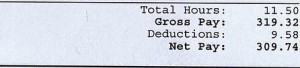
All performers need to email a copy of the Voucher AND the Time Report Summary (the top portion of their pay stub) with their commission payment to accounting@torontofilmextras.com. If you don't have your Time Report Summary and your cheque was issued by EP Canada, a copy can be found at my.ep.com.
See the full fee and commission schedule for cancellation, no-show and late fees.
Reference
Where to find your Time Report Summary
The Time Report Summary is the top portion of your pay stub. Email a copy of it, along with your voucher, with every commission payment.